The colors
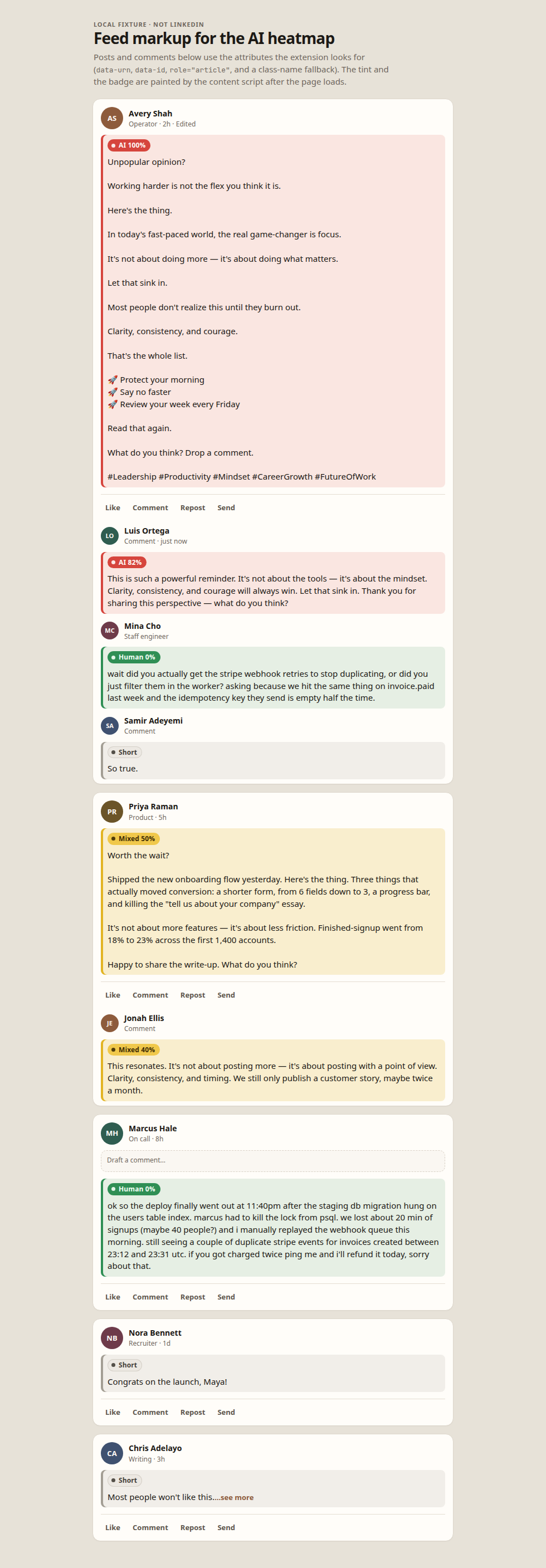
Each post body and each comment gets a left bar, a light tint, and a small badge. Hover the badge for the signals behind the number. Scores are whole percentages.
-
AI · red · 67–100%
Reads as mostly generated or heavily rewritten. The 66.67% line rounds onto 67.
-
Mixed · yellow · 34–66%
Specific details mixed with machine-like patterns. The band starts at 33.33%.
-
Human · green · 0–33%
Few of the patterns the scorer associates with AI writing.
-
Short · grey
Under 15 words of visible prose. Left unscored instead of forced into a color.
What it looks like
This is a local fixture that copies LinkedIn’s post and comment markup. The tints come from the extension’s content script. It is not a screenshot of a signed-in account.
Load unpacked
Chrome installs this from a folder, not from the Chrome Web Store. The zip has to be unpacked first.
-
Download the zip
Use the button on this page. The file is
linkedin-ai-heatmap.zip. -
Unzip it
Open the archive. Inside, the folder must contain
manifest.jsonnext to asrcfolder and aniconsfolder. -
Open the extensions page
In Chrome, paste
chrome://extensionsinto the address bar and press Enter. -
Turn on Developer mode
The switch is at the top right of that page.
-
Click Load unpacked
Choose the unzipped folder itself — the one that contains
manifest.json. Do not select the zip file. -
Open your feed
Go to linkedin.com/feed. Badges appear on posts and on comments as they load. The toolbar icon opens a popup with the on/off switch, the scoring mode, and the counts for the page you are on.
How a score is made
The default scorer runs in the browser and does not send post text anywhere. It looks for habits common in AI-written LinkedIn posts: stock phrases such as “delve”, “in today’s fast-paced”, “game-changer”, “here’s the thing”, and “let that sink in”; em dashes; “it’s not X, it’s Y” frames; rule-of-three lists; emoji bullets; one-line-per-paragraph layouts; very even sentence lengths; a question hook; a “what do you think?” ending; and a block of hashtags.
Specific times, amounts, named tools, slang, and uneven sentences pull a score down. One buzzword on its own stays in the green band. An optional language-model mode can be turned on later inside the extension’s options. If that request fails, the badge falls back to the on-device score.
The number is a style estimate. A careful human paragraph can look even, and quoting a cliché to argue with it can still raise the score.